• Link to LinkedIn
  • Link to Facebook
  • Link to X
  • Link to Youtube
  • Service: 866-692-9082
  • Customer Portal
  • Sales: 866-792-6638
  • Get A Quote Now
E-N Computers
  • Managed IT Services
    • Managed Services Plans
      • Fully Managed
      • Co-Managed
      • CMMC & Compliance
    • Support & Management
      • Help Desk Services
      • Onsite IT Services
      • Account Management
      • M365 Administration
    • Security & Compliance
      • Cybersecurity
      • IT Compliance Consulting
      • CMMC Consulting
    • Monitoring & Maintenance
      • Backups & Disaster Recovery
      • Patch Management
      • Network Monitoring & Incident Response
  • Professional IT Services
    • IT Consulting
      • CMMC Consulting
      • CMMC Gap Analysis
      • Cybersecurity
      • IT Consulting
    • On-Site & Staffing
      • Network Projects
      • Office IT Relocation
      • Security Cameras
      • IT Staff Augmentation
    • Telecommunications
      • Business VoIP Telephone Service
      • Business Internet Service
      • Electronic Fax Service
    • Emergency IT Services
  • Learning Center
    • Business-IT Strategy
    • Cybersecurity
    • IT Hiring & Staffing
    • Managed IT Services
    • Videos
    • E-Rate Resources
  • About
    • Testimonials
    • Team
    • Partners
    • Areas We Serve
    • Our Process
    • Careers
  • Pricing
    • Service Plans
    • Managed Services Pricing Calculator
    • Consulting
    • VoIP
    • Projects & Professional Services
  • Contact
  • Menu Menu
  • Managed IT Services
  • Professional Services
  • Learning Center
  • About
  • Pricing
  • Contact

Checklist – Don’t Forget To:

[x] Add internal links to service pages & blogs
[ ] Add an image to each section
[x] Set the Meta description and URL slug
[ ] Update both premium content offer boxes
[x] Update the Table of Contents
[x] Write a featured snippet
[x] Set the Featured Image
[ ] Set Category and Tags
[ ] Delete this checklist!!

After publishing. Link new article to related older articles.

How to switch IT providers

Man and woman shaking hands across a table

by Scott Jack
Content Contributor, E-N Computers
7+ years experience in healthcare IT and tech support.

If you are currently contracted with an IT managed service provider (MSP), but it’s not working out, you may consider switching to a different one. What does the process look like? 

  1. Read and understand your contract 
  2. Clearly identify why you want to switch 
  3. Research other MSPs and choose one 
  4. Notify your current MSP 
  5. Plan the transition 
  6. Execute the plan 
  7. Verify all systems.

QUICK ANSWER:

How do I switch to a new IT MSP?

First, make sure you’re clear on your reasons for switching. Then do research to pick a new one that will fit your needs. Once you’ve secured your new IT MSP, you can notify your old one that you are terminating services and begin making plans for the transition. Your ability to switch may be affected by contract terms, leasing, and licensing arrangements.

Table of Contents

  1. Read and know your contract
  2. Identify your reason for switching
  3. Research and choose a new MSP
  4. Notify your current MSP
  5. Plan the transition
  6. Execute the plan
  7. Verify all systems
  8. How long will it take?
  9. Potential problems
  10. Learn more about managed IT services

Read and know your contract

There’s one important step you should take first: read your contract. Your contract with your MSP includes important details of your relationship with them, including: 

  • contract length 
  • cancellation terms 
  • services they provide 
  • how and when services are discontinued 
  • what information they are required to turn over 

First, you need to know how long your contract is and when the term ends. While E-N Computers provides clients with monthly plans, many MSPs use contracts with one-, three-, and five-year terms. It’s generally easier to make the switch near the end of your contract. But you still need to make sure to know and follow the cancellation terms. 

Your contract cancellation terms describe how and when notice of termination must be provided. Provide written notice of your intent so it’s documented. However, the contract may specify that the notice must be sent by email to a particular email address, by certified mail, or some other method. It also likely specifies how many days of notice you must provide — and you might have to provide more notice than you think! 

Identify your reason for switching

You may have a vague sense of unhappiness with your current MSP but take time to sit and write out the specific reason or reasons you are thinking about switching. Common reasons to make such a significant change are: 

Unsatisfactory service. This may include long wait times, poor communication, a pattern of not providing full resolution the first time, a lack of staff and resources to support your growing business, or a failure to maintain accurate documentation that help desk personnel can use to support your staff quickly and properly. 

High cost (for services provided). Your MSP may charge more than you can afford or want to spend, or you may feel that the value they provide doesn’t match what they are charging. Or you may want to try a different pricing model. 

Need for specialized expertise. You may want an MSP more experienced in meeting your industry’s regulatory compliance requirements, providing enhanced cybersecurity, or simply supporting the technology needs of similar businesses. 

Writing out your reasons for switching will help you clarify what you want out of your next MSP relationship and will make the next step — researching and choosing a new MSP — much easier. 

Research and choose a new MSP

With your pain points written down, it’s time to start looking at your options. Using your preferred search engine, look for “managed IT services your city/state” (e.g. “managed IT services Richmond”). Some of the companies listed will be local, while others will be larger regional or national providers. 

When evaluating MSPs, there are several factors to consider. We call this the MSP Seven-Point Inspection. The factors are: 

  1. Help desk response time
  2. On-site support 
  3. Backup and disaster recovery 
  4. Third-party vendor partnerships 
  5. Industry expertise 
  6. Consulting, strategy, and budgeting 
  7. Pricing model 

We go through each of these in more detail in our article, How to Choose an MSP. 

To help you start your search, we’ve put together lists of some of the best MSPs across Virginia and Washington, D.C. 

  • Best IT MSPs in Virginia 
  • Best Outsourced IT Providers in Richmond 
  • Best Outsourced IT Providers in Roanoke 
  • Best IT MSPs in Washington, D.C. 

Once you’ve narrowed your choices down to two or three, reach out to them to discuss your situation and ask any questions you didn’t find an answer to on their website. (Here’s our contact page.) Your chosen MSP can help you work through the details of your transition and each of the following steps. 

Notify Your Current MSP

You should notify your current MSP in writing of your intent to cancel services. In your notice of termination, include a list of details that need to be worked through, such as setting a plan to cancel or transfer each service they provide; settling all outstanding invoices; understanding any termination fees, additional support fees, or post-cancellation support fees; the transfer of all technical documentation; and the removal of all administrative access and deletion of documentation and backups after the contract has ended. You can download our free Notice of Termination template to help you get started. 

Learn more by reading our article, How to Terminate an IT Services Contract. 

Plan the transition

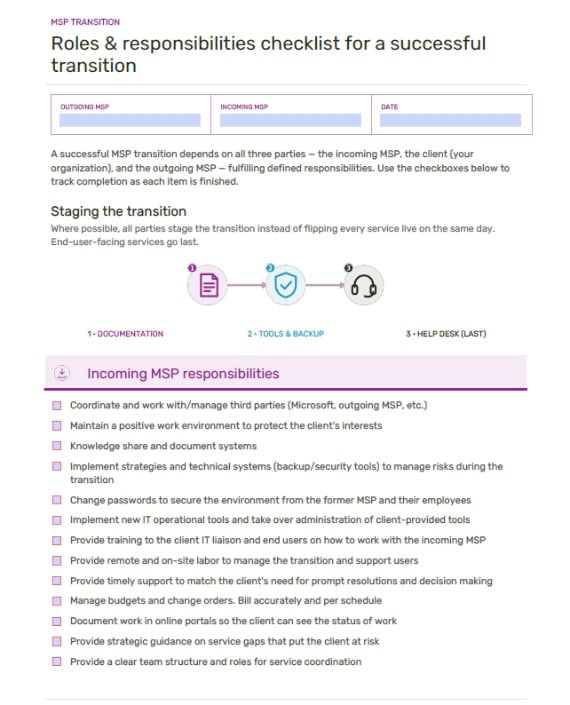
With your old MSP notified that you are terminating services with them, it’s time to start planning the migration to your new MSP. Here’s how we handle that at ENC. 

Within three days of you signing our Master Services Agreement, we hold an internal meeting so that all our teams — sales, projects, procurement, accounting, service, and account management — are on the same page and can make sure all bases are covered. At this point, we need a single point of contact within your organization to run all communication through. We’ll begin setting you up in our systems for documentation, support tickets, and billing. 

Within a week of you signing the agreement, you will have a kickoff meeting with our sales and projects teams. (The projects team is responsible for onboarding.) During this meeting, we will explain what to expect during onboarding, and we will schedule regular check-ins for the onboarding project (typically weekly). We’ll update you on any hardware procurement and decide what your backups should include. We’ll also ask you to gather information that includes internet provider details, software vendors and licensing, administrative passwords, and email provider details. 

After the kickoff meeting, we aim to execute rapidly. 

Execute the Plan

Within a week of the kickoff meeting, we will implement our backup system and begin installing our management tools on your servers and workstations. We’ll begin documenting your systems and ask for your employee onboarding and offboarding process. 

Once we have our management tools on your computers, we will introduce you to the client portal and all the ways you can submit a ticket. We’ll also ask about your fax and phone systems and your website domain details. 

Verify All Systems

Before the projects team hands you off to the service team, they will have the service team confirm that there is enough documentation to do so. They will also verify that backups are occurring and are usable. 

At the handoff meeting, you’ll be introduced to your account manager and the service manager. We’ll provide you with the date of your first on-site visit and explain what to expect during that visit. Finally, you’ll set a recurring meeting with your account manager, as well as a time for us to train your liaison, or point of contact. 

How Long Will It Take?

At ENC, we take about one month to fully onboard a new client, regardless of whether they have no IT, internal IT, or are switching from another MSP. However, there are some potential problems that can cause delays. 

Potential Problems

There are several potential problems during an MSP transition that can increase how long it takes to be fully free of your old MSP. Some factors that can affect the timeline are: 

An uncooperative MSP can make a transition tricky. They may not have up to date, complete documentation or they may refuse to turn it over. They may not be willing to talk to your new MSP, making you act as a go-between. Or they may altogether avoid answering questions. We can work through most situations like this, but a cooperative MSP makes the work much easier. 

Leased or rented equipment that is owned by or financed through your old MSP is another obstacle. Leases often don’t transfer, meaning that the equipment will be removed when your contract ends unless your old MSP provides you with a buyout option. This, combined with long lead times for network equipment, could leave you without essential hardware for months. 

Some service contracts, such as those for backups and Microsoft 365, are difficult to get out of early. Your old MSP might have to continue to support these for an extended period until the contract is up.  

  • Backups. Your old MSP should still support their backup solution if you’re in a contract for it. If they don’t, it’s possible to run our backup solution in tandem, but that will impact your internet performance. 
  • Microsoft 365. Because Microsoft 365 licenses are purchased on an annual basis, your old MSP will continue managing them until they come up for renewal and can be transferred to your new MSP. If your old MSP uses the same reseller as us, Pax8, it may be possible to transfer license management to us before then. 

Learn More About Managed IT Services

READ: How to End an IT Service Contract 

READ: How to Onboard Employees When You Have Outsourced IT 

If you haven’t tried, it can be worth attempting to work out any issues with your current MSP before cutting them loose. But if your partnership isn’t working out, we have some practical tips for How to End an IT Service Contract. 

Properly onboarding and offboarding employees is critical for your ability to get work done and protect company data. When you outsource your IT, you must coordinate your internal process with theirs. Learn more about how we work with clients to add and remove employees in the article, How to Onboard Employees When You Have Outsourced IT. 

Take the IT Maturity Assessment

Is your business ready to weather changes, including employee turnover? Find out by taking our IT maturity assessment.

You’ll get personalized action items that you can use to make improvements right away. Plus, you’ll have the opportunity to book a FREE IT strategy session to get even more insights into your IT needs.

Take the Assessment
Search Search

Categories

  • Best of
  • Business-IT Strategy
  • Compliance
  • Cybersecurity
  • Internet, Telephone, & VoIP
  • IT Hiring
  • Managed IT Services
  • Tech Tools & Tips
  • Uncategorized

Recent Posts

  • How a Virginia defense contractor scored a perfect 110 on SPRS — and won contracts before certification June 16, 2026
  • The IT RFP questions your vendors are hoping you won’t ask May 11, 2026
  • Best managed IT for Virginia healthcare providers April 27, 2026
  • Best managed IT for SMBs in the DC metro area in 2026 April 10, 2026
  • Best IT services for law firms in Virginia April 7, 2026
EN Computers logo

Industries

Accounting & CPA

Construction & Architecture

Defense Contractors

Education (K-12)

Financial Services

Government Contractors

Healthcare

Investment Advisors

Law Firms

Manufacturers

Marketing & Advertising

Nonprofit Organizations


Locations

Waynesboro, VA
Corporate HQ

215 Fifth St.
Waynesboro, VA 22980

Sales: 540-217-6261
Service: 540-885-3129
Accounting:  540-217-6260
Fax: 703-935-2665

Washington D.C.
1126 11th ST. NW
Suite 603
Washington, DC 20001-4366

Sales: 202-888-2770
Service: 866-692-9082

VA DCJS # 11-6604

Locations

Harrisonburg, VA
45 Newman Ave.
Harrisonburg, VA 22801

Sales: 540-569-3465
Service: 866-692-9082

Richmond, VA
3026A W. Cary St.
Richmond, VA 23221

Sales: 804-729-8835
Service: 866-692-9082

Website by Abstrakt Marketing Group © 2026
  • Privacy Policy
  • Sitemap
  • Linkedin
  • Facebook
  • Youtube
Scroll to top Scroll to top Scroll to top