

 by Scott Jack
Content Contributor, E-N Computers
Driving growth through technical operations and documentation for 15 years
Updated March 16, 2026
How much do IT support services cost for a small business? Here at E-N Computers, we’ve answered this question for hundreds of small businesses in Virginia, Maryland, and Washington, D.C. since we started doing business in 1997.
When we start talking with a prospective client, we find that many of them are surprised to learn that they don’t really know how much their IT services are costing them. Many of them are paying an IT vendor or consultant every month, but that represents only a portion of their total IT spend.
Others may be looking to hire a dedicated IT person but aren’t familiar with all of the costs that go into running an IT department. This can make it difficult to compare and price the different IT management options available to you on an apples-to-apples basis.
QUICK ANSWER:
How much do IT support services cost per month?
An all-inclusive managed IT services plan typically costs between $125-$220 per computer-using employee per month. For a typical 40-employee company, this would be about $5,000 per month. Costs can vary within this range depending on existing IT staffing, compliance requirements, and other factors
Table of Contents
- The true cost of IT: what your P&L doesn’t show
- A three-person IT team runs $192,600 a year
- Why break/fix costs more than you think
- Full managed IT: your entire IT department for $125/user/month
- Keep your IT person, just don’t hire a second one
- What AI tools mean for your budget in 2026
- Real-world savings: what managed IT costs you
- Ready to get your IT under control?
So which option actually costs less over time: managed IT, an in-house team, or the old break-fix approach?
We’ll compare costs for the following IT support options:
- Building an in-house department
- Hiring a break/fix service or contractor
- Using barebones managed IT services
- Using full managed IT services
- Using co-managed IT services (sharing the work between your in-house staff and a managed IT services provider)
Tech support cost comparison
| Type of IT Support | Cost for 40 employees | What’s not included |
|---|---|---|
| Break/fix Services | $75 to $200 per hour.
Downtime costs businesses an average of $300,000 per hour | Additional costs for hardware refreshes, security audits, and upgrades. Exhorbitant costs associated with downtime or cyberattacks resulting from a lack of preventative maintenance |
| In-house IT Department | $192,600 per year or $402 per user per month | Difficult to find a jack-of-all-trades technician who also has specialized expertise |
| Co-Managed IT Services | $86,000 per year or $180 per user per month (Includes in-house IT person’s salary) | Does not usually include level 1 support if this is performed by the in-house technician |
| Full Managed IT Services | $60,000 per year or $125 per user per month | On-site support visits may incur additional fees |
| Retainer Plus Monitoring | $2,000 per month (includes break-fix hours) or $24,000 a year | Some software or systems may be “out of scope” and billed separately. Limited automation, documentation, and proactive leadership. |
| Retainer Services | $1,500 per month (10 support hours), $175 per hour thereafter. $18,000 base cost per year. | Costs for hardware, security audits, and network upgrades not included. Plans may lack tools or software. |
The true cost of IT: what your P&L doesn’t show
Most businesses keep track of their recurring operating expenses in detail. But the same isn’t always true of their IT spending.
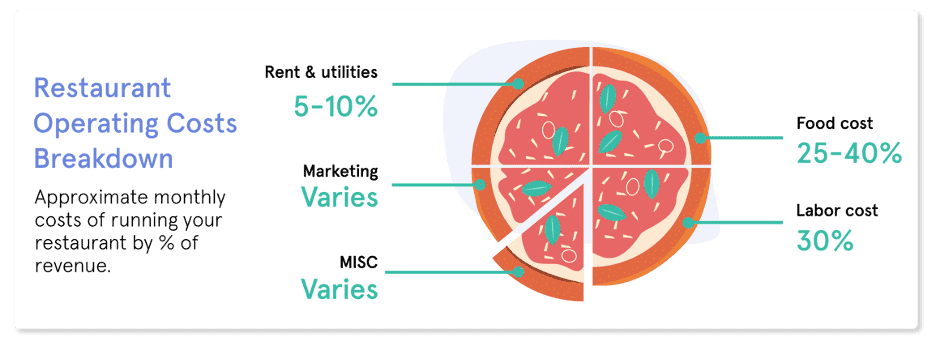
For example, a restaurant could tell you down to the penny how much it spends on food as a percentage of total revenue. But how much of their budget was spent on keeping their IT systems running? Servicing their point-of-sale terminals? Fixing the computers used by the administrative staff to order food, design menus, and run payroll?
For most businesses, these expenses are scattered among several different categories and accounts. Internet service may fall under utilities, while purchasing new computers or network upgrades could be either capital or operating expenses, depending on how they’re depreciated or accounted for. This makes it difficult to get an overall picture of IT spending as a fraction of operating costs or percentage of revenue.
An even bigger mystery for many businesses is the hard-to-quantify costs associated with relying on inefficient or outdated IT solutions. For example, how much revenue is lost if your warehouse order fulfillment system goes down for an hour? A day? Or how much of your administrative staff’s time is wasted each month searching for files in an outdated document management system?
In these cases, failing to pay for IT up front results in higher costs through daily inefficiencies or massive emergency spend later on.
The hidden cost of cloud subscription sprawl
Increasingly, small businesses are coming to us with overwhelming tech costs — they have subscriptions to multiple cloud services and software that are eating up their budget even without support costs factored in.
One recent client was spending $15,000 a month just on email. Others were paying for Dropbox, Google Drive, and Microsoft 365 simultaneously. We’ve helped many clients reduce their cloud subscription costs simply by better utilizing the tools already included in their M365 licensing and eliminating redundant services.
These costs can be lurking in different categories — labor, marketing, operating expenses, and capital expenses could all be inflated by redundant or poorly managed cloud tools. They can even appear in accounts receivable, in the form of longer payment cycles and more overdue invoices when staff can’t efficiently access the systems they need.
One ransomware incident wipes out years of IT savings
Some costs stemming from poor IT service are easier to quantify because they come from massive expenditures surrounding an emergency situation — most often a cybersecurity incident.
Schools, government and smaller businesses are particular targets. In March, the city of Waynesboro had 350 GB of data stolen from its network. In April 2023, hackers intercepted login information from several Virginia state employees as the workers tried to access the state’s human resources and payroll apps on their personal devices.
A recent study found that schools were more likely to be victims of ransomware than any other industry. Experts say this was because they did not put as much time and money toward cybersecurity, and they were more willing to pay a ransom rather than risk exposure of sensitive data about students and employees.
In a recent survey, the vast majority of small and medium-sized businesses reported their cost of downtime as $300,000 or more per hour.
If any of that sounds familiar, it’s worth asking whether your IT model is actually the right one. The main decision: build an IT department in-house, or hire out?
A three-person IT team runs $192,600 a year
For many businesses, their first thought is to hire one or more full-time IT specialists to manage their technology resources. But how much does it really cost to build a quality IT department?
The biggest expenditure will likely be salary and benefits. IT salaries vary based on location, experience, and skill requirements. On average, you can expect to pay a general-purpose IT technician around $55,000 to $75,000 per year in total compensation — and that’s at the lower end of the market in many regions.
There’s not really any such thing as a “general-purpose IT technician.” Most competent IT people have long since discovered that specialization is the key to a more rewarding job and a better salary. IT engineers tend to focus on a specific area — infrastructure, networking, email, cybersecurity, or client support — which makes it extremely difficult to find a true jack-of-all-trades.
Building an IT department involves more than just hiring people. Those people need tools and proven processes for everything from help desk tickets to server upgrades. Consulting fees to help build those processes can range from $1,500 to $3,000 per month. Tools — password managers, ticketing systems, security monitoring, antivirus, internet filtering — add another $15–$35 per endpoint per month.
Here’s what a lean three-person IT team costs for a 40-employee company:
| Staffing | IT Director Infrastructure Specialist Support Technician | $75,000 $50,000 $50,000 |
|---|---|---|
| Tooling | $20/user/month | $9,600 |
| Consulting | $1,500/month | $18,000 |
| Total per year | $192,600 | |
| Per user per month | $402 |
Why break/fix costs more than you think
Break-fix services refer to the practice of only calling on a professional IT company when something breaks or when an upgrade is needed. Generally, hourly rates range from $75 to $200 or more per hour.
While it may sound like a reasonable approach, it’s not an ideal solution because you’re reactively responding to issues rather than actively preventing them. Smaller businesses and nonprofits are a particular target of hackers, and a single incident of downtime or a cybersecurity breach can be catastrophic.
Cyber insurance carriers are increasingly requiring businesses to demonstrate proactive security measures like monitoring, patching, and endpoint protection as a condition of coverage. A break/fix client who can’t document those controls may find their policy invalid when they need it most.
We can’t recommend the break/fix approach regardless of the up-front cost savings, because of the risk involved and because there are better options for small businesses on a tight budget.
Retainers keep the lights on, but not much more
For most companies with 10 to 100 employees, hiring an outside company makes the most sense. But there’s a wide range in both cost and quality among IT vendors.
The basic retainer model has you pay per month for a fixed block of hours, then an hourly rate beyond that. A 40-person company might pay around $1,500 per month for 10 support hours, then $175 per hour thereafter.
The retainer-plus-monitoring model includes some monitoring and tooling for a higher fee (around $2,000 per month), plus a set number of break-fix hours. This is an improvement, but often comes with scope limitations that cause the same deferred-maintenance problems.
Both models suffer from a lack of automation, documentation, and proactive leadership — tending toward “band-aid” solutions rather than strategic IT decisions.
Full managed IT: your entire IT department for $125/user/month
For a flat per-user or per-computer monthly fee, a fully managed IT plan provides all the services typically offered by a large corporate IT department — help desk, consulting, remote monitoring and management (RMM), and the required tools and software.
A fully managed IT service plan typically costs between $125 and $220 per user or computer per month. Factors that push toward the higher end include compliance requirements (such as CMMC for defense contractors), complex infrastructure, and multiple locations.
Our typical managed services plan costs $125 per user per month, or about $60,000 per year for a 40-employee company. This includes unlimited help desk support, remote monitoring, consulting, and more.
Additional pricing: add-ons and compliance
Some infrastructure and compliance requirements are priced separately:
- $100/month per additional server, VPN connection, or network closet
- $2,250/month flat for CMMC compliance consulting (for defense contractors)
- $75/user/month for compliance tooling packages (GRC software, GCC High licensing)
- Prepaid discounted support retainers for onsite visits and small projects
Keep your IT person — just don’t hire a second one
Co-managed IT services allow you to keep at least one IT person in-house while offloading either daily help desk services or higher-level prevention and planning to an MSP. You still have the salary cost of at least one in-house person, but you avoid the cost of hiring more technicians or managers as your business grows.
Our co-managed IT services are $75 per user per month. With an in-house first-level IT support person costing $45,000–$65,000 in salary, this adds up to about $86,000 per year for a 40-person company — roughly half the cost of an entirely in-house team.
What AI tools mean for your IT budget in 2026
Artificial intelligence tools have introduced a new layer of IT cost complexity that most pricing guides haven’t caught up to yet.
There are a few ways AI increases costs. Microsoft Copilot licensing is a $20 to $30/user/month add-on (depending on whether you have Business Premium or Enterprise licenses). Also, AI governance and security policies require additional tooling and oversight, and the expanded attack surface created by AI integrations adds to security stack requirements.
Careless AI integration adds cost. Proper AI implementation requires documented policies and procedures, good data hygiene, governance, security controls, and training. Done right, it can reduce the support burden and improve how your technology investments pay off over time.
Real-world savings: how managed IT saves money
A fully managed IT plan can seem more expensive than an hourly or retainer model. But we’ve seen again and again how customers save money every month after making the switch.
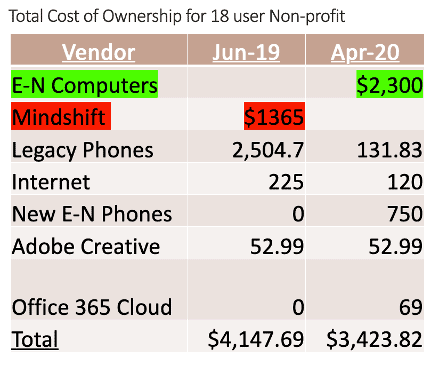
For example, an 18-user Lexington, VA nonprofit was paying their old IT vendor $1,365 per month. Our managed services plan ran about $1,000 more per month — but by retiring their legacy phone system and replacing it with a VoIP system, and cutting their internet bill nearly in half, they realized a net savings of over $700 per month, or $8,500 per year.
More recently we’ve found new clients are struggling with cloud subscription costs. One recent client was spending $15,000 a month just on email. Some were paying for Dropbox, Google Workspace and Microsoft 365. We have helped them and others reduce their cloud subscription costs simply by better utilizing Microsoft 365 and eliminating the rest.
Ready to get your IT spending under control?
Do you know how much you’re paying for IT support? If you’re not sure, or you don’t know if you’re getting value from your IT spend, we’ll review your current spending and show you where it’s going. No sales pitch. Just a clear answer.
Not sure if you’re getting good value from your current IT support? Take our free IT Maturity Self-Assessment. In just 5 minutes, you’ll get actionable insights about your people, processes, and tools — plus the opportunity to book a free strategy call with one of our advisors.
Not sure if you need managed IT services?
Take the IT Maturity Self-Assessment

In a few minutes, get actionable insights on your IT strategy, plus a free strategic consultation.